Google Ads
Connect Google Ads accounts, launch playbooks, track campaign performance, and manage spend across your franchise locations.
Track Google search and display campaigns alongside your Meta ads in Flamel, without switching platforms. Hub admins connect the ad accounts; workspaces see their own performance data.
Before you start
Hub admins configure the Google Ads connection. Workspace owners can view their own campaign performance once an account is connected. You will need a Google account with access to the Google Ads account for this location. Connections are managed under Connected Accounts.
Connect a Google Ads Account
Open Connected Accounts
In your workspace, open Connected Accounts and find the Google Ads section.
Sign in with Google
Click Connect Google Ads and authorize Flamel with the Google account that has access to your Google Ads account.
Select the ad account
Choose the Google Ads Customer ID to link to this workspace. If your Google account has access to multiple accounts, only link the one that runs ads for this specific location.
One account per workspace
Each workspace should be connected to its own Google Ads account. Linking a shared or manager account can cause attribution data to mix across locations.
Connection Shapes
A Google Ads account reaches Flamel in one of two shapes. Both shapes work. Check which one you have before you troubleshoot reporting.
| Shape | What it looks like | Who uses it |
|---|---|---|
| Direct account | The workspace links an ad account with no manager account above it. | A location that owns its Google Ads account outright. |
| Client of a brand manager account | The workspace links an ad account that sits under the brand manager account. | A brand that keeps each location as a client of one manager account. |
Google calls a manager account an MCC. When you choose an account, Flamel sorts the choices into two groups.
The groups read Ad accounts (recommended) and Manager accounts (MCC).
Always choose the account under Ad accounts (recommended). Choose it even when that account is a client of the brand manager account. Flamel finds the manager account above it on its own. You never enter it.
The groups read Manager accounts (recommended) and Ad accounts.
Choose the brand manager account under Manager accounts (recommended). The hub then sees every client account below it.
Flamel supports the client shape everywhere it reads or writes Google Ads data:
- Performance reporting for the workspace.
- The sync that keeps campaign settings current in Flamel.
- Budget and status changes you make in Command Center.
A direct account, with no manager account above it, works as it always has.
Older client accounts
A client account under a brand manager account could once show as Connected and still report a sync failure. If an account still shows an old sync error, open the Google Ads Analytics view and click Sync.
View Campaign Performance
Once connected, open Google, then Ads from the navigation to see your campaigns. Use the date range picker to compare performance across different periods, and filter by campaign type (Search, Display, Performance Max) to focus on what matters most.
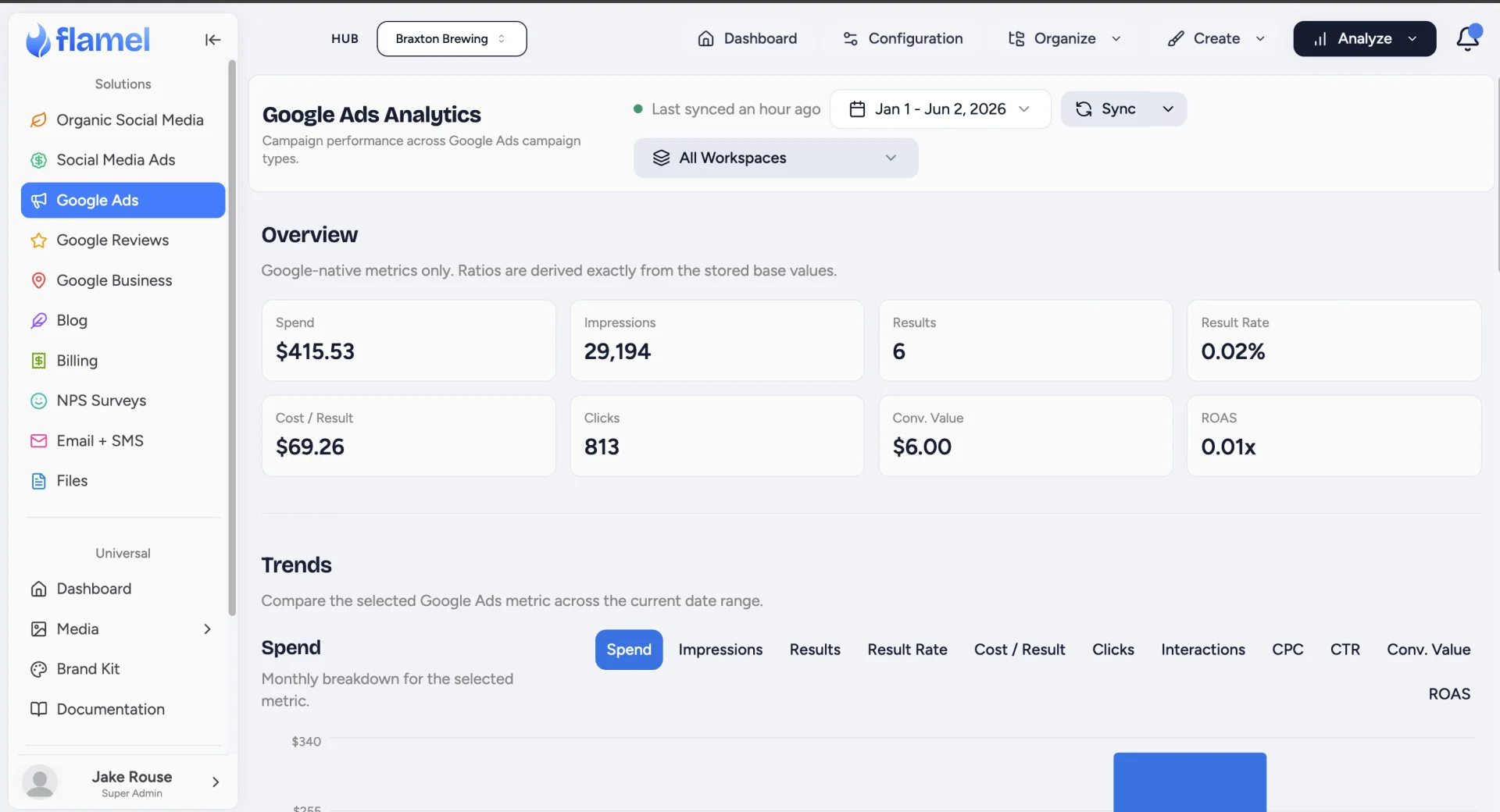
The Budget card shows your monthly budget cap (if set in Flamel), spend to date this cycle, remaining budget, and projected month-end spend based on current pacing.
Keep Reporting Current
Google limits how fast anyone reads from its reporting interface. When Google asks Flamel to slow down, Flamel waits and then reads again. It no longer drops the pull. Busy accounts and large hubs therefore keep complete numbers.
To pull fresh numbers yourself, click Sync on the Analytics view. The arrow beside it opens two more choices: Sync recent (24h) and Full historical backfill (all available data).
Attribute Unattributed Campaigns
If campaigns appear in the unattributed list (shown on the Google Ads campaign view when a campaign has no workspace match), they are running in the connected Google Ads account but have not been matched to a Flamel workspace. This usually happens when:
- A new campaign was created directly in Google Ads after the connection was set up.
- The campaign uses a landing page or tracking template that does not include the workspace identifier.
To attribute a campaign, open it from the unattributed list and use the workspace selector to assign it to the correct workspace. Once assigned, its spend and conversions roll into that workspace's performance.
Launch Playbooks on Google Ads
Hub admins build Google Ads playbooks, and workspaces opt in to them. Read Playbooks for the full workflow.
A Workspace That Connects Its Own Account Can Launch
A workspace that connects Google Ads through its own Google sign-in can now launch a playbook. Such a workspace used to show as Connected and still fail at launch. A workspace whose account the hub links behaves as before.
Watch Launches in Recent Opt-Ins
The hub Google Ads dashboard shows a Recent Opt-Ins card. Each row names the workspace, the playbook, the budget, the run dates, and the launch status.
Two filters sit above the list:
- The status filter starts on All Statuses and counts the opt-ins in each state.
- The workspace filter starts on All workspaces and accepts more than one workspace.
Click View all in the card header to open the full Opt-Ins page. That page adds a search box and shows every opt-in at once.
Hub admins only
The Recent Opt-Ins card and the Opt-Ins page belong to the hub. A workspace sees its own playbooks in their place.
Read a Partial Launch
One playbook can hold more than one campaign. When some campaigns launch and others do not, the opt-in reports Partial. Flamel never reports a part-finished launch as a clean success.
Do this when you see Partial:
Open the playbook
Open Google, then Ads, then Playbooks. Open the playbook and find the workspace in its opt-in list.
Read the reason
The workspace panel names what stopped the campaigns that did not launch.
Correct the cause, then retry
Fix the cause in Flamel or in Google Ads. Then click Retry Deployment.
The campaigns that already launched keep running. A retry reuses them and builds only what is missing.
A Launch That Cannot Correct Itself Reports at Once
No retry fixes some launch problems. A bad landing page address is the common one. Flamel reports that kind of failure on the first attempt.
Before this change, Flamel retried such a launch several times before it told anyone. The opt-in now reads Launch Failed straight away, with the reason. Correct the cause, then click Retry Deployment.
A problem that passes on its own, such as a busy moment at Google, still retries quietly in the background.
Fix a Disconnected Account
If the Google Ads connection shows an error, the OAuth token may have expired, the Google account password changed, or the account access was revoked. To fix it, open Connected Accounts, disconnect the Google Ads connection, and reconnect with a Google account that currently has access to the ad account.
Flamel refreshes each active Google Ads connection every 24 hours, so a working account stays connected without anyone signing in again. A timeout or a Google server error never disconnects an account, because neither is a verdict on your access. Flamel leaves the connection active and reads again later. When an account does show as disconnected, the access really was expired, revoked, or changed, so reconnecting is the fix.
Reference
Performance Metrics
| Metric | Description |
|---|---|
| Impressions | How many times your ads were shown |
| Clicks | How many times users clicked |
| CTR | Click-through rate (clicks divided by impressions) |
| Cost | Total spend for the period |
| Conversions | Tracked actions (calls, form fills, purchases) |
| CPA | Cost per conversion |
Launch Statuses
| Status | What it means |
|---|---|
| Deploying | Flamel is building the campaigns in Google Ads. |
| Running | Every campaign in the playbook launched. |
| Partial | Some campaigns launched and some did not. Retry the deployment. |
| Launch Failed | No campaign launched. Read the reason, correct it, and retry. |
| Finished | The run dates passed. |
Attribution Layers
Google Ads attribution in Flamel uses a three-layer model.
| Layer | What it covers |
|---|---|
| Workspace-level | Campaigns linked directly to a workspace's Google Ads account |
| Hub-level | Campaigns run from the Hub's account targeting specific locations |
| Shared account | Campaigns from a manager account shared across multiple workspaces |
Shared accounts need careful setup
If multiple workspaces share a Google Ads manager account, Flamel uses location targeting and campaign labels to attribute spend per workspace. Work with your Hub admin to confirm the tagging is set up correctly before relying on per-workspace numbers.