Give Franchisees a Library of Ready-to-Use Content Ideas
Give franchisees a ready-to-use library of content ideas they can easily customize, localize, and turn into social posts.
For Hub Admins
A shared library of Post Ideas gives franchisees a starting point for creating content without requiring the Hub to create every post for every location. Build ideas around your monthly campaigns, promotions, seasonal moments, and recurring content themes, then share them with workspaces when the plan is ready.
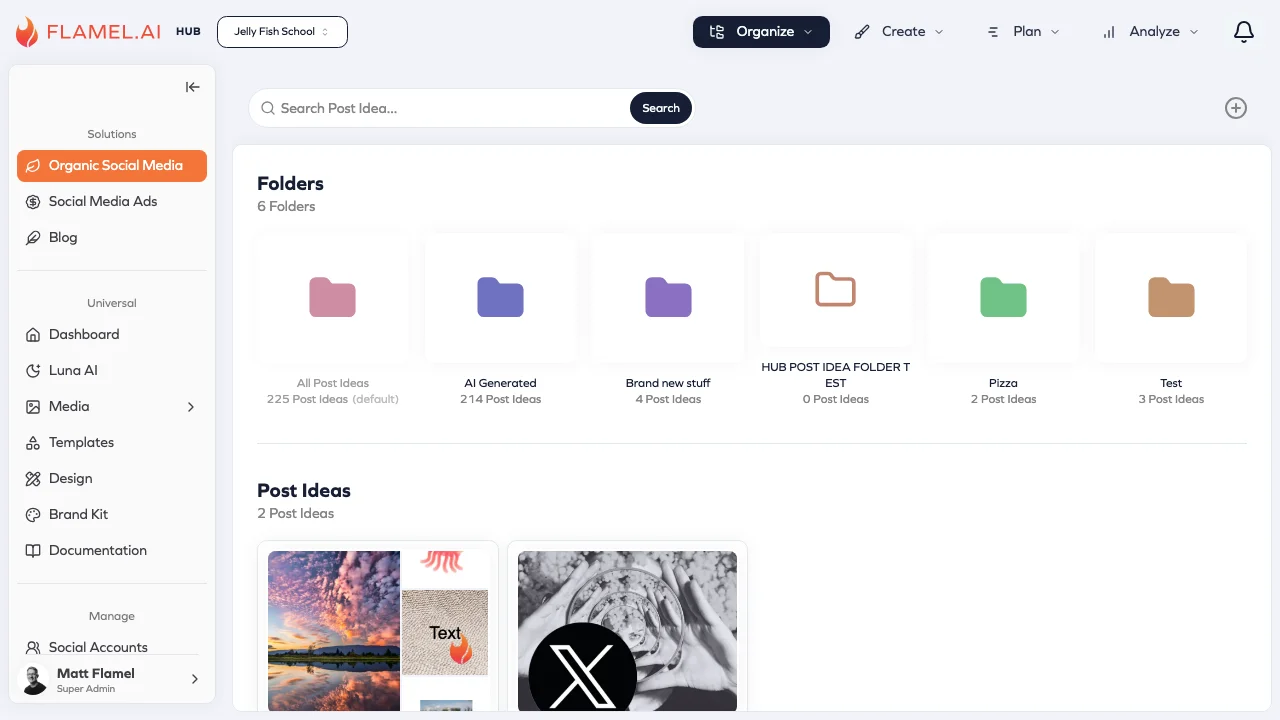
Build Your Content Idea Library
Open Post Ideas
In Flamel's Organic Social solution, go to Organize > Post Ideas.
You can create and manage ideas for your content calendar and share finished ideas with your bound workspaces.
Plan Ideas by Month or Campaign
Organize your content ideas around campaigns and moments your franchise network plans to support.
For example, you might create a collection for:
- January content
- Seasonal promotions/campaigns
- New product launches
- New location campaigns
Creating a dedicated folder or organized collections for each month can make it easier for franchisees to find the ideas that are relevant for them right now.
Build Your Monthly Content Plan
Aim to provide approximately 20 post ideas per month as a starting point. The exact number may vary based on your brand's posting cadence and how much local content you expect franchisees to create themselves.
A monthly library could include a mix of:
| Content Type | Example |
|---|---|
| Promotional | Monthly offers or featured services |
| Educational | Tips, FAQs, or industry insights |
| Seasonal | Holidays and seasonal moments |
| Brand | Company news or brand initiatives |
| Community | Local reviews and photos from local events |
| Team or customer content | Ideas featuring local employees or customers |
| Engagement | Questions, polls, or conversation starters |
The goal is to give franchisees enough direction to post consistently without making every location's social presence look exactly the same.
Create and Prepare Ideas Before Sharing
Create a New Idea
Click the + button to create a new folder or a new Post Idea.
Add a clear title and description explaining what the franchisee should create or post.
Add Reference Media
Attach images, videos, graphics, canva templates, or other assets that can help franchisees create the final post.
This gives locations a starting point, but they can still customize or replace assets with media that makes sense for their market.
Add Captions Variants
You can use Workspace Variables directly in Post Idea captions to automatically personalize shared content for each location.
Click the Variable icon while editing.
For example, a Hub could create one idea using: “Stop by our {location_name} location today!”
When a workspace creates a post from that idea, the variable can resolve using that location's information.
This helps you create one content idea for the entire network while still making the final content feel local.
Share Ideas With Your Workspaces
Save Ideas as Drafts
If you're not ready to share an idea with your workspaces, click Save Draft.
Draft ideas are only visible to Hub administrators, so you can build out your monthly content library, review captions and media, and make changes before franchisees see anything.
When an idea is ready, click Publish to make it available to your bound workspaces.
Publishing a Post Idea does not publish a social media post. It gives franchisees access to the idea so they can create their own localized version.
Share a Full Month of Ideas
A useful workflow is to build the upcoming month's content as drafts, review everything, then publish the complete collection to your workspaces at once.
This gives franchisees a clear content library to work from and allows them to plan ahead.
Let Franchisees Make Content Local
Published Hub ideas appear alongside each workspace's own Post Ideas.
Franchisees can open a shared idea and customize it before creating a post. They can:
- Adjust the caption for their local audience
- Add location-specific details
- Replace or add media
- Personalize the post using their workspace information
This approach gives the network a consistent strategy while allowing each location to create content that feels relevant to its own community.
Turn an Idea Into a Post
Once a franchisee is ready to use an idea:
Open the Idea
Go to Organic Social > Organize > Post Ideas and select the idea they want to use.
Create the Post
Click Use Post Idea to open the Post Editor with the idea's description and any attached media as a starting point.
Customize the Content
The franchisee can edit the caption, add local details, and update the media before publishing.
Schedule, Publish, or Save as a Draft
Once the post is ready, select the appropriate social accounts and choose whether to publish immediately, schedule it for later, or save it as a draft.
A Scalable Content Workflow
A shared Post Ideas library works best when the Hub provides a strong starting point and franchisees add the local context that makes the content relevant.
A simple monthly workflow could look like this:
Hub: Build approximately 20 content ideas around campaigns, seasonal moments, promotions, and recurring themes.
Hub: Add workspace variables and reference media where appropriate.
Hub: Keep ideas as drafts while planning and reviewing the monthly calendar.
Hub: Publish the finished ideas to bound workspaces.
Franchisees: Choose the ideas most relevant to their location and customize them with local details.
Franchisees: Turn the ideas into posts and schedule them on their own content calendars.
This gives franchisees a reliable content pipeline while helping the brand maintain a consistent strategy across the network.
Related Articles
Create, organize, draft, and publish content ideas for your workspaces.
Use location and custom variables to personalize shared content automatically.
Plan and schedule content across your publishing calendar.
Store and manage media that can support your shared content ideas.