Creative Types
Decide between Manual and Dynamic creative on a Meta ad set, understand Advantage+ enhancements, and preserve per-ad reporting.
For Hub Admins
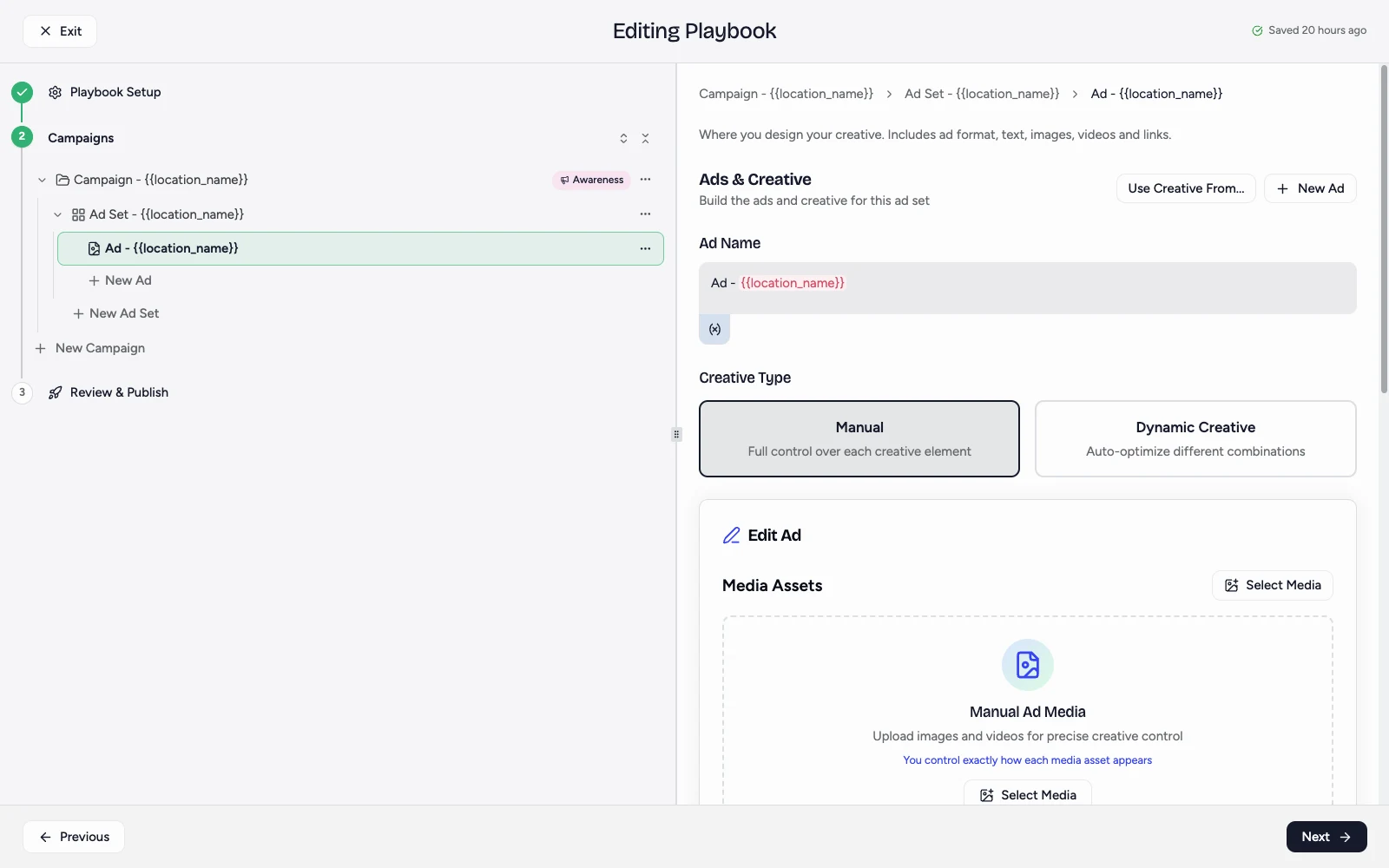
You choose Creative Type in the Ads & Creative panel, which opens when you select an ad in the campaign sidebar. The choice applies to every ad in that ad set, not to the one ad you selected. Workspaces inherit it and cannot change it during opt-in.
Open Paid Social Ads, then Playbooks, and edit a playbook. In the campaign sidebar, select an ad under the ad set you want to configure. Creative Type is under Ad Name in the Ads & Creative panel.
Is It Called Dynamic Or Flexible?
Both. The name changes with your campaign objective, and Flamel matches whichever term Meta uses for that objective.
| Campaign objective | The second option reads | What Meta does |
|---|---|---|
| Sales, App Promotion | Flexible | Meta automatically renders the best format per person, and can build a carousel from your images |
| Awareness, Traffic, Engagement, Leads | Dynamic Creative | Meta auto-optimizes different combinations of your media and text |
The two are the same choice inside Flamel. Meta replaced Dynamic Creative with Flexible on Sales and App Promotion in 2024, so the label follows the objective you picked on the campaign step. Both are the opposite of Manual.
The Two Choices
Manual gives you full control over each creative element. You build the ad, and what you approve is what runs. Each ad runs a single image or a single video with the copy you assign to it.
A manual ad holds one image or video. To run eight pieces of media, build eight ads: create the first, duplicate it, and swap the media on each copy.
Dynamic Creative or Flexible hands a pool of media and text to Meta. Meta assembles and rotates the combinations inside a single ad.
| Manual | Dynamic or Flexible | |
|---|---|---|
| Who assembles the ad | You | Meta |
| Ads per ad set | One ad for each creative | One ad holds every asset |
| Per-ad performance data | Yes, for every creative | Combined into one ad |
| Pause or replace one creative | Yes | No, the pool is one unit |
| Carousels | Only when you build one | Meta can generate them |
| Best at | Learning what works | Getting volume live fast |
Why Many Teams Choose Manual
Manual keeps one creative equal to one ad. That is what makes a campaign reviewable after it launches.
- You can see which creative won. In the Command Center, expand a campaign to the ad level and every ad reports its own spend, clicks, and results. A dynamic ad reports one combined number.
- You can swap one loser and keep the winners. Pause the single ad that underperforms, or open it and replace its media. The rest of the ad set keeps delivering and keeps its learning.
- You can tell a franchisee what to repeat. "The team photo beat the storefront photo" is a conversation you can only have with per-ad numbers.
- Approved creative runs as approved. Nothing is recombined into a layout your brand team never reviewed.
Dynamic Is Not A Creative Test
Meta's per-asset breakdown for dynamic and flexible ads has been unreliable for years. A creative-level breakdown started to roll out in 2026, but it is not enabled on every ad account. Treat a dynamic ad as a delivery container, not as a way to find a winning creative. When the question is "which of these images performed best?", use Manual.
When Dynamic Or Flexible Earns Its Place
- Creative fatigue in a small audience. A location with a tight radius shows the same people the same ad again and again. Ten assets in one container stay fresh longer than one.
- Volume without a testing question. You have ten approved seasonal assets and you do not need to know which one wins. You want them all live today.
- Ad account limits. Meta limits how many ads run for each page and each account. Ten assets in one dynamic ad use one slot instead of ten.
- Placement coverage on Sales campaigns. Flexible adapts the format and the aspect ratio for each placement, so one ad set can serve Feed, Stories, and Reels well.
Give it a real mix to work with. Upload 1:1, 4:5, and 9:16 versions, and keep videos to 15 seconds or less so they qualify for Stories and Reels.
Advantage+ Creative Enhancements Are A Different Setting
Advantage+ creative is not the same as Dynamic or Flexible, and the two are often confused. Dynamic mixes the multiple assets that you upload. Advantage+ creative takes one finished ad and modifies it at delivery time. Both can run on the same ad.
Meta's enhancements include visual touch-ups, image expansion, brightness and contrast, text overlays, text improvements, an enhanced call to action, automatic translation, music, relevant comments, and site links.
Why Some Teams Turn Enhancements On
- Placement coverage without extra production. Visual touch-ups and image expansion fit one asset to Feed, Stories, and Reels. You do not have to produce every aspect ratio by hand.
- Meta reports a modest gain. Meta states that standard enhancements give an average reduction in cost per result for campaigns that optimize for link clicks, landing page views, and offsite conversions.
- Thin creative libraries. When a location launches with one or two assets, extra variations give the delivery system more to test.
- Multiple languages. Automatic translation removes a production step when one concept runs across markets with different languages.
Why Some Teams Turn Enhancements Off
- Meta can change what you said. Text improvements rewrite a headline, soften a claim, or merge lines. If the exact wording is the offer, such as a price, a guarantee, or legal language, this is a real risk.
- Meta can change where people go. Site links add links pulled from your website and can send a prospect outside the campaign landing page.
- Meta can add content you do not control. Relevant comments place third-party text under your ad.
- Art direction breaks. Overlays stamp text onto a designed image, generated backgrounds replace a background that is part of your brand, and motion effects work against creative meant to stay still.
- Compliance exposure. In regulated categories, an automatic rewrite of approved copy can move an ad from off-brand to non-compliant.
The Franchise Version Of This Problem
A hub approves one creative and deploys it to many locations. With enhancements on, the ad that runs in each market is not exactly the ad the brand team signed off. Turn enhancements off when your brand standards or your legal review must hold in every market, and turn them on when speed and placement coverage matter more.
How Flamel Handles It
Flamel creates every new playbook ad with all Advantage+ creative enhancements turned off, for both Manual and Dynamic ads. Your creative deploys as you uploaded it unless you choose otherwise.
To set the rule for the whole hub, open Paid Social Ads, then Configuration, then Creative Enhancements, and use Disable Advantage+ creative enhancements. Open What gets disabled? to see the full list. The setting applies to new ads only, so ads that already run keep their current behavior.
Set The Creative Type
Choose the objective first
The objective decides which options exist. Sales and App Promotion show Flexible. Other objectives show Dynamic Creative.
Select an ad in the campaign sidebar
Expand the campaign and the ad set, then click an ad. The Ads & Creative panel opens, and Creative Type sits under Ad Name.
Pick Manual, or the automated option
Click Manual to build each ad yourself. Click Dynamic Creative or Flexible to give the pool to Meta. Flamel sets every new ad set to Manual.
Choose before you build the ads. If the ad set already holds ads, Flamel shows a warning and then removes them, because the two types store creative differently.
Build the ads
On Manual, add one ad for each creative. On Dynamic or Flexible, add your media and your text variations to the single ad.
Limits To Know
| Situation | What happens |
|---|---|
| Messaging destinations | Manual only. Meta rejects dynamic creative for Messenger, Instagram Direct, and WhatsApp destinations, so the option is disabled. |
| Dynamic Creative ad count | One ad for each ad set on non-flexible objectives. Flexible ad sets allow more. |
| Flexible objectives | Sales and App Promotion only. |
| Mixing types | An ad set holds one creative type. You set it from an ad, but it applies to every ad in that ad set. |
| Live campaigns | Ads that already run keep their type until the playbook deploys again. |
Meta continues to consolidate Dynamic Creative and Flexible into Advantage+ creative, and moved the Flexible control under Format display options in Ads Manager during 2026. Flamel keeps the same Manual and Dynamic choice and handles the format underneath, so your playbooks do not change.
Related Articles
Build the campaign, ad sets, and ads where you set the creative type.
Review by-ad performance, pause a single ad, and swap creative after launch.
See results by workspace across your whole network.
The campaign, ad set, and ad structure behind these choices.